The same conversation on every screen
Phone, browser, and desktop, linked with a scan and managed from your phone. Notifications reach all of them, and fixes ship without a store round trip.
- iOS
- Android
- Web
- Desktop
- Link with a scan
- Log out remotely
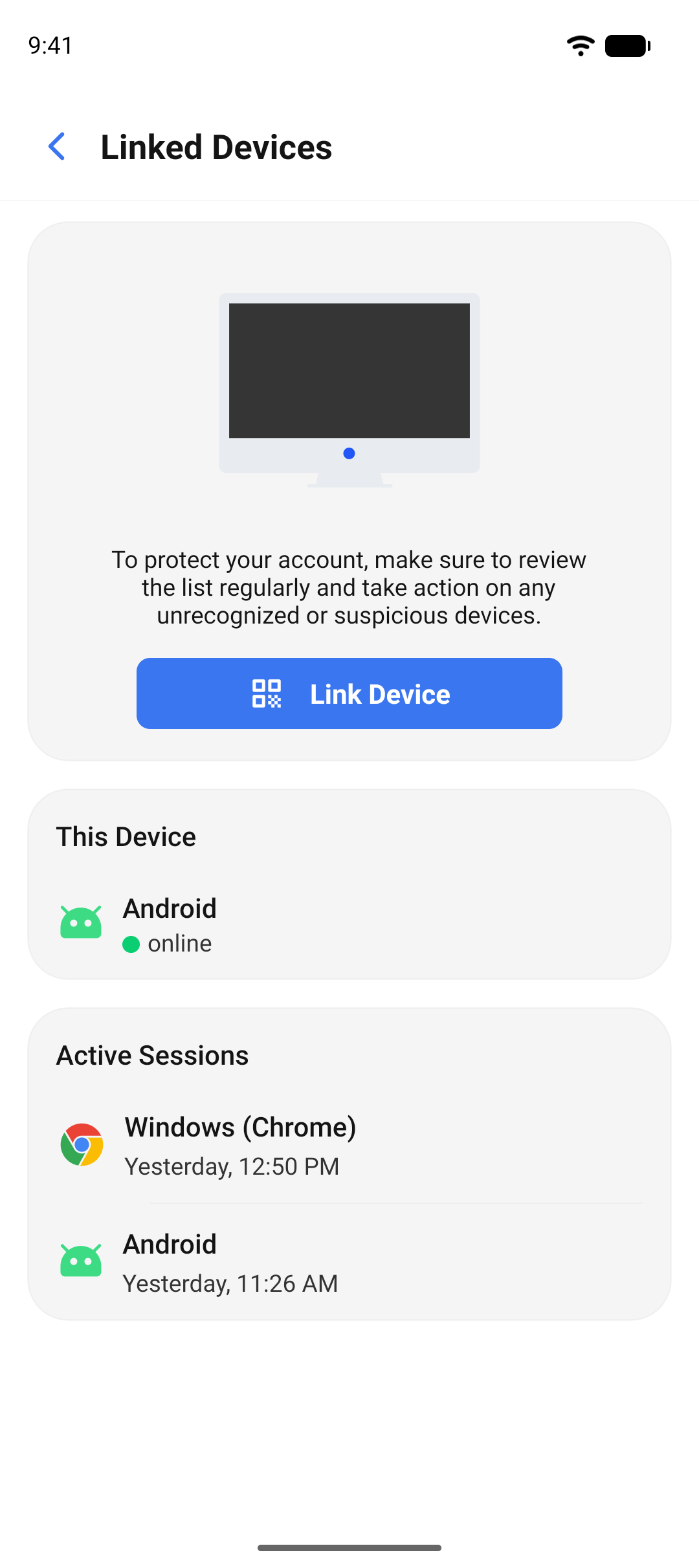
Link a browser in seconds
- 1
Scan
Open the web app or the desktop app and scan the QR code with your phone. No password typed into a shared computer, no code sent by text. The link is approved from the phone you hold, so a browser you did not scan never gets in.
- 2
Linked
The browser or desktop shows the same chats, the same calls, and the same read state, and keeps working when the phone is off. Each linked device holds its own keys, so a message is encrypted for every device you own, not decrypted and forwarded. Your admin sets how many you can link.
- 3
Log out remotely
The linked devices list shows each phone, browser, and desktop on your account and when it was last active. Left a browser open somewhere? Log it out from your phone and it stops receiving messages immediately.
One account, every device
iOS
A native app in the App Store, or distributed by your organization.
Android
A native app in Google Play, or distributed by your organization.
Web
Link a browser with a scan. Messaging, calls, and recordings included, and it works on its own once linked.
Desktop
A desktop app for the workday, with the same calls and screen share as the phone.
Notifications on every device
A message or a call rings through on every device without waking the app, whether it is open, in the background, or closed.
Fixes ship without a store update
Small updates reach your devices directly from your deployment, without waiting for a store review, on the schedule your admin sets. Updates that change the native app still go through the stores or your organization's distribution.
Get the app on every device you use.
Download the app for iOS and Android, open the web app, or install the desktop app.